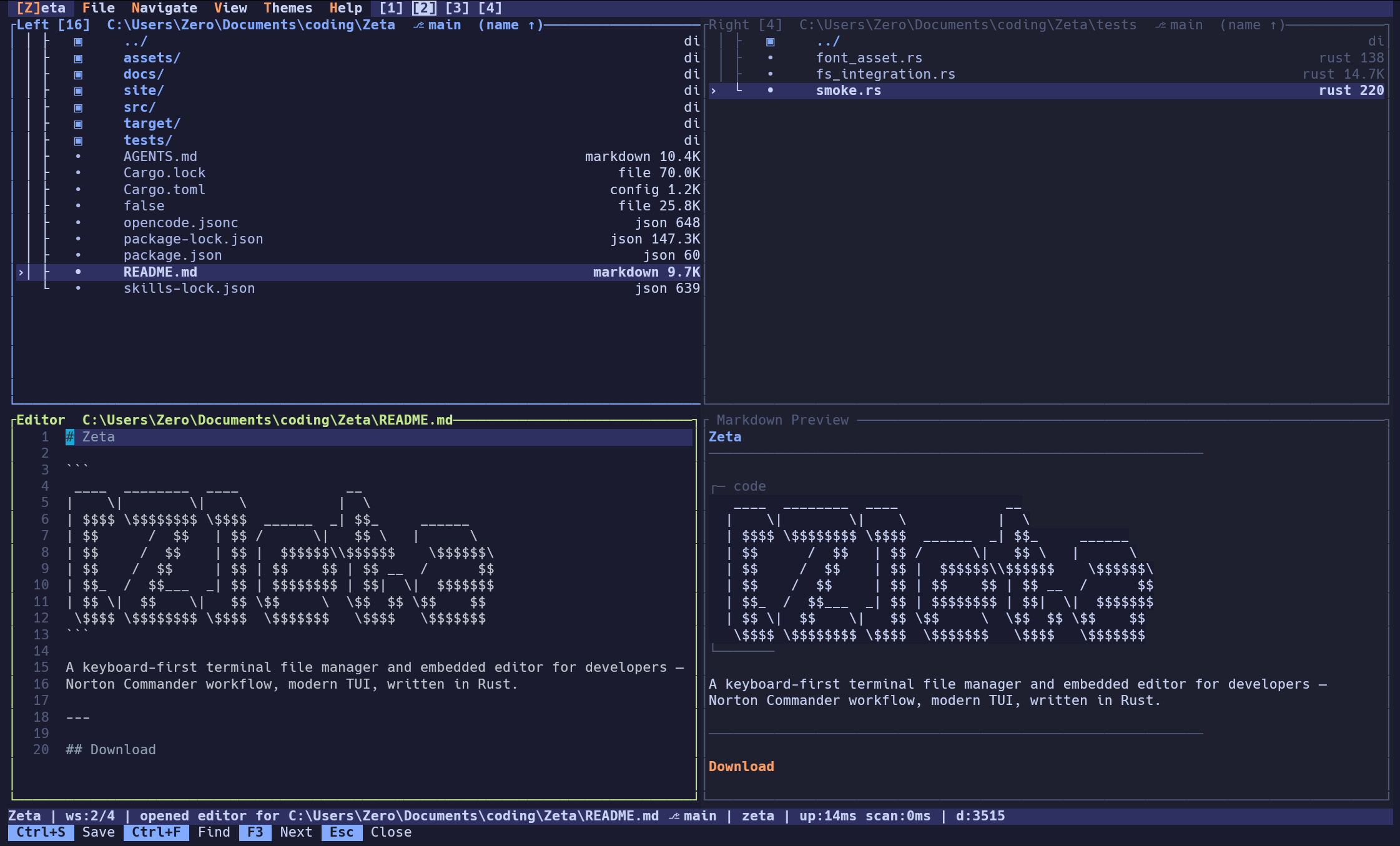
A dual-pane terminal file manager with an embedded editor, integrated terminal, SSH/SFTP, git awareness, archive browsing, workspaces, themes, and a command palette — all running in your terminal on a Rust core.
View all changed files and their diffs without leaving the terminal. Side-by-side coloured hunks with a line-number gutter, full keyboard navigation, and mouse scroll support.
NEW
▤
View → Themes Flyout
Switch themes live from a nested flyout submenu under View — no config file editing, no restart. Navigate with arrow keys and preview themes without leaving the keyboard.
NEW
🖴
Norton Commander Theme
Authentic CGA/DOS palette — dark blue panels (#0000AA), bright cyan borders (#55FFFF), yellow key hints (#FFFF55). The real thing, not a loose approximation.
rustcore language
ratatuiterminal UI framework
crosstermterminal I/O
ropeyeditor rope buffer
ssh2SFTP filesystem
syntectsyntax highlighting
tomlconfig format
// features zeta --help
Dual Pane
Two independent panels side by side. Navigate, compare, and operate across directories without a second terminal window. Navigation history with back/forward stacks.
Embedded Editor
Syntax highlighting, undo/redo, incremental search, text selection, find & replace. Edit files without spawning an external process. Ropey-backed for fast editing of large files.
Integrated Terminal
Full PTY terminal embedded in the layout. Toggle with F2. All keys forwarded as raw escape sequences. Fullscreen mode. Stay in your filesystem context without context-switching.
SSH & SFTP
Browse and operate on remote filesystems over SSH. Password, key file, and SSH agent auth. Host key verification with known-hosts persistence. Full remote file operations.
Markdown Preview
Live rendered preview side-by-side while editing .md files. Headings, code blocks, lists, blockquotes — updated on every keystroke, zero latency.
4 Workspaces
Four isolated desktops each with independent pane state, editor, preview, and terminal. Switch with Alt+1–4. Workspace state persists across sessions.
Diff Mode
Highlight unique and changed entries between panes at a glance. Sync to the other pane with a single keystroke. Colour-coded: green (new), red (removed), yellow (changed).
Git Integration
Branch and dirty-state indicator in the pane header. Per-entry change markers — modified, added, untracked at a glance. Built-in diff viewer with side-by-side colour-coded hunks.
Full Mouse Support
Click to focus panes, scroll to navigate, select entries, resize panels. Right-click for context menu. Mouse-friendly while keeping keyboard-first UX.
Archive Browsing
Enter ZIP, tar.gz, tar.bz2, and tar.xz archives to browse contents as a virtual filesystem. Extract single files for in-place preview. Navigate nested archives like directories.
Flyout Menu Bar
Nested flyout submenus in the menu bar — hover or arrow-key into a submenu without losing focus. Theme switching, file ops, and navigation all accessible via Alt+letter.
File Operations
Copy (F5), move (Shift+F6), rename (F6), delete (F8) with progress tracking, trash support, collision dialog, and batch operations on marked files. Resume on failure.
Type / to filter entries by glob pattern. Ctrl+P opens a recursive fuzzy file finder that searches the entire directory tree. Instant, no indexing needed.
Command Palette
Shift+P opens a fuzzy-matched command palette with 40+ actions. Navigation, file ops, editor, view, settings — every action discoverable and a keystroke away.
Self-Update
Automatic update checks on startup (configurable). One-keystroke install on quit when a new version is available. Pins to tagged releases for reproducible builds.
Session Persistence
Pane state, CWDs, sort modes, history, and workspace layout saved to session.toml. Pick up exactly where you left off. Non-fatal fallback on read errors.
File Watcher
Filesystem events auto-refresh pane contents when directories change. Config file changes trigger live reload of settings. No manual refresh needed.
~25k
lines of rust
40+
actions & commands
10
built-in themes
<10 MB
release binary
~30 MB
ram at idle
519
passing tests
// keyboard first
global
F1 / ?Help / Context-aware cheatsheet
F10 / Ctrl+QQuit Zeta
Shift+PCommand palette
Ctrl+OOpen settings panel
Ctrl+WCycle focus between panes / panels
F12Toggle debug panel
navigation
↑ ↓ / j kMove selection up / down
Enter / → / lEnter directory / open file
Backspace / ← / hGo to parent directory
Alt+← / Alt+→Back / forward in history
Alt+G / Ctrl+GGo to path prompt
PgUp / PgDnPage up / down in file list
Home / EndJump to first / last entry
.Toggle hidden files
Ctrl+PRecursive fuzzy file finder
/Quick-filter entries by glob
file operations
F5Copy selected to opposite pane
Shift+F6Move selected to opposite pane
F6 / rRename entry
Ctrl+RBulk rename all marked files
F7New directory prompt
InsertNew file prompt
F8Move to trash
Shift+F8Delete permanently
oOpen with OS default application
Alt+OOpen With menu
Alt+LFollow symlink target
Ctrl+Shift+CCopy selected path to clipboard
selection & marking
SpaceToggle mark on current entry
Ctrl+AMark all entries
Shift+MClear all marks
Shift+↑ / Shift+↓Extend selection up / down
view & panels
F2 / Ctrl+\Toggle integrated terminal
F3Toggle preview panel
Alt+F3 / Alt+PFocus preview panel
F4Open selected file in editor
F9Toggle diff mode
Ctrl+LToggle details / compact view
s / SCycle sort mode
+ / _Grow / shrink left pane
Shift+← / Shift+→Shrink / grow left pane width
Alt+1–4Switch workspace instantly
F11Toggle editor fullscreen
editor
Ctrl+SSave file
Esc / F4Close editor
Ctrl+FFind in file
F3 / Shift+F3Next / previous search match
Ctrl+HFind & replace
Ctrl+Shift+HReplace all
Ctrl+ZUndo
Ctrl+Y / Ctrl+Shift+ZRedo
Ctrl+MToggle markdown preview
Ctrl+X / Ctrl+C / Ctrl+VCut / Copy / Paste
bookmarks & git
Ctrl+BAdd bookmark for current directory
Ctrl+Shift+BOpen bookmarks modal
Ctrl+DToggle git diff viewer
// prerequisites
rustup
Rust toolchain manager. Installs the stable compiler and cargo.
The embedded terminal uses the ConPTY API introduced in Windows 10 version 1809. Earlier Windows versions are not supported. (Windows only)
Precompiled binaries skip native build steps entirely — grab one from the releases page to avoid the C toolchain requirement.
// why it exists
Zeta started as an excuse. Testing a new generation of AI coding tools calls for a
real project — something with actual architecture decisions, non-trivial state, and things
that could genuinely go wrong. Toy examples tell you nothing.
The idea came from memory. If you used a PC in the late 80s or early 90s,
you probably know Norton Commander. Two panes, function keys, everything a keystroke away.
That mental model never really leaves you.
So the goal became building something in that spirit — keyboard-first, fast,
dual-pane — but brought forward: embedded editor, integrated terminal, SSH support,
multiple workspaces, all on a Rust core with a proper TUI.
Zeta is what came out of that. Part experiment, part nostalgia project,
part something that turned out to be genuinely useful.